
Recruitics is a data driven, recruitment marketing agency. Their services vary from Recruitment and Programmatic Advertising, Employer Branding to Analytics & Tracking.
As a part of the product team, I focused on servicing the design and functionality for the analytics & tracking part of the business.
MY ROLE
Lead and solo advocate for the user – I was responsible for the entire design lifecycle from design research to user flow / journey mapping, prototyping, validation, implementation, and verification (post-development).
TEAM
Product, Engineering & QA
Mark Jensen, SVP of Product
Helena Hennessy, Product Manager
Phillip Kalmes, Lead Applications Engineer
Todor Mikanov, Lead QA
Stoicho Monev, Developer
MY TIME AT RECRUITICS
While many of the projects were long term and business oriented for the companies growth, we created and developed many ad hoc requests from both internal and external users.
While many of the projects were long term and business oriented for the companies growth, we also created and developed many ad hoc requests for both internal and external users.
As the first designer working within an engineering focused environment, I was tasked with creating the initial design systems as well as improving already existing processes. The majority of my time was spent refocusing the team and gaining buy in from stakeholders. Thankfully, I had great product and engineering teams who provided necessary and valuable feedback and helped improve the time between initial design and final implementation. It was also to my advantage that the products we were building were internally facing so our users were always close and available for feedback sessions.
This case study will focus on the larger projects from my time at Recruitics and will highlight some honorable mentions at the end.
Thank you for reading :)
PROJECT
Decentralized Budgets
In an effort to push many of our clients in the direction of a decentralized budget model, we introduced a solution that would allow clients to effectively manage their individual stores.
In effect, allowing them to make timely hiring decisions by adjusting initiatives that aren’t yielding results and shift monies into strategies that work.
GOAL
USERS
User - Take control of recruitment efforts by spending on job advertising through individual store budgets on an adhoc basis.
Recruitics - Drive new net revenue through a large volume of small budgets from all of the different franchises .
Field recruiters, restaurant managers, HR

PROBLEM
Most companies have established budget practices and processes in place – agreeing to a completely new system and process can be daunting. Luckily, the clients we wanted to test this with were pretty much immediately on board. Now, we had to figure out how to work around the following:
01. Introduce new application
People aren’t always keen to change. We all have our methods and processes, after all, we’re creatures of habits. The only way to excite someone about changing their entire process is to prove that this system will exceed most expectations.
02. Multiple users, different needs
From field recruiters to hiring managers, we needed to understand the needs of each user. Field Recruiters are the individuals responsible for advertising and hiring for jobs. Hiring Managers may have access to more information on a store than a field recruiter. They could also have different levels of permissions for a job or how far they could go into the application process. Our goal was to uncover all use cases.
03. Lack of knowledge of vendor sites
Through user interviews, we discovered that some clients didn’t have much knowledge on third party vendors. All vendors provide values in different ways, so providing an experience that could guide an inexperienced user was important to consider.
DECENTRALIZED BUDGETS
Creating the Functionality | MVP 1
01. Guided Experience
One of the discoveries my PM and I made during our user interviews was that some clients didn’t have much knowledge on third party vendors or the value they provided. Budgets vary per client, job listing, quarterly goals, etc. If a user only has XYZ to spend, we should be able to recommend a boost plan based on a quick questionnaire based on their needs for that job.
Areas of opportunity
User friendly language - much of the language we used was brought over from our internal user application. While it’s good to be consistent, some of the language may not offer enough context on what certain things mean. This could be solved with the following:
- Helper text
- Informational tooltips
- Header accompanied with subheader info
- Onboarding and user training
If we had continued this project, we would have liked to test copy options with users to see which one provided most value and information to their process.
02. Independent experience
This flow would cater to more experienced users that know their spending budget and how each vendor could bring them value.
The hierarchy of the fields was an important factor when creating this flow. Each vendor has a set cost per boost that cannot be changed because of the contract they have with Recruitics. When you select a vendor, it is important for the cost per boost to be present as it will be apparent to the user how their price may fluctuate.
The start date and duration is also important because similar to the cost per boost, each vendor has a pre set amount of dates that the boost must be live for. For example, Indeed requires your boost to be live for no more or less than 14 days. “Reach” is the only vendor that allowed customization of budget and boost duration, making it one of the more popular vendor choices for Client Strategists and clients.
MVP 2, TBD
We tested the prototypes above with a few field recruiters and HR personnel which provided us with action items to move forward with an MVP 2. However, the project was put on hold due to COVID-19. We did however have plans in mind for what these action items would look like. MVP 2 would include access rights, permissions for different users, as well as billing methods and reporting on job performance.
PROJECT
Craigslist Vendor Integration
In an effort to provide a more cost effective solution for our clients, we integrated Craigslist as a vendor to maximize job postings for less. This solution would also benefit the company as Joveo, our usual third party source to Craigslist postings, charges Recruitics $5 per post.
Not only would we be adding value to our users by creating a more consistent experience with our other vendors, this would also save Recruitics around $50K on each client monthly.
GOAL
USERS
User - To post a higher volume of jobs with less manual effort, freeing up resources for other activities.
Recruitics - Match and improve the functionality of Joveo so that we could remove the tool from the process, and by doing so saving the company 50K/month.
Publisher Operations, Client Strategists

&

My Product Manager and I conducted various user research sessions with our Publisher Operations team which helped us gather requirements early on. From there, we discussed various concepts.
One of our main goals was to take some of the load off our PubOps team. They received hundreds of requests daily from Clients Strategists to post jobs on Craigslist for them.
PubOps was essential in our weekly feedback sessions. They’d always address any concerns regarding the design and functionality. Initially, they were concerned that we’d release something too advanced and users would still resort to reaching out to them for assistance. We kept this in mind through our design process.
Trial and error
CRAIGSLIST FEES
Initially, there was debate on whether or not we should should show users a breakdown of the fees charged by Craigslist. Craigslist charges a fee per job post which is determined by the market you’ve selected for that job. Additionally, Recruitics charges a fee to support boosting a job through Craigslist.
My PM and I wanted to be as transparent as possible in showing these fees to the user, as we felt that users would appreciate the transparency. We received push back from the PubOps team that it would actually be better to not show users the cost as it could confuse the user more and as a result, lead them to reach out to them for answers.


Although we were really striving for transparency, we also wanted to respect our users and honor their request to not include a cost breakdown. They made a good point that in the end, users already expect to pay a certain amount with Craigslist and unless it was a huge price jump, they wouldn’t question it. Providing users with access to this information could cause confusion, leading them to reach out to PubOps which went against our goal to ease their workload.
CRAIGSLIST
MVP 1 | Implementation
01. Create a Job Boost with Craigslist through our API
While our engineering team worked on integrating Craigslist into our application in the backend, I worked on creating a usable experience on the front end. We already had a way to post jobs through our Job Boosts feature, so I went ahead and added some additional content required by Craigslist to allow our users to successfully create their first Craigslist boost.
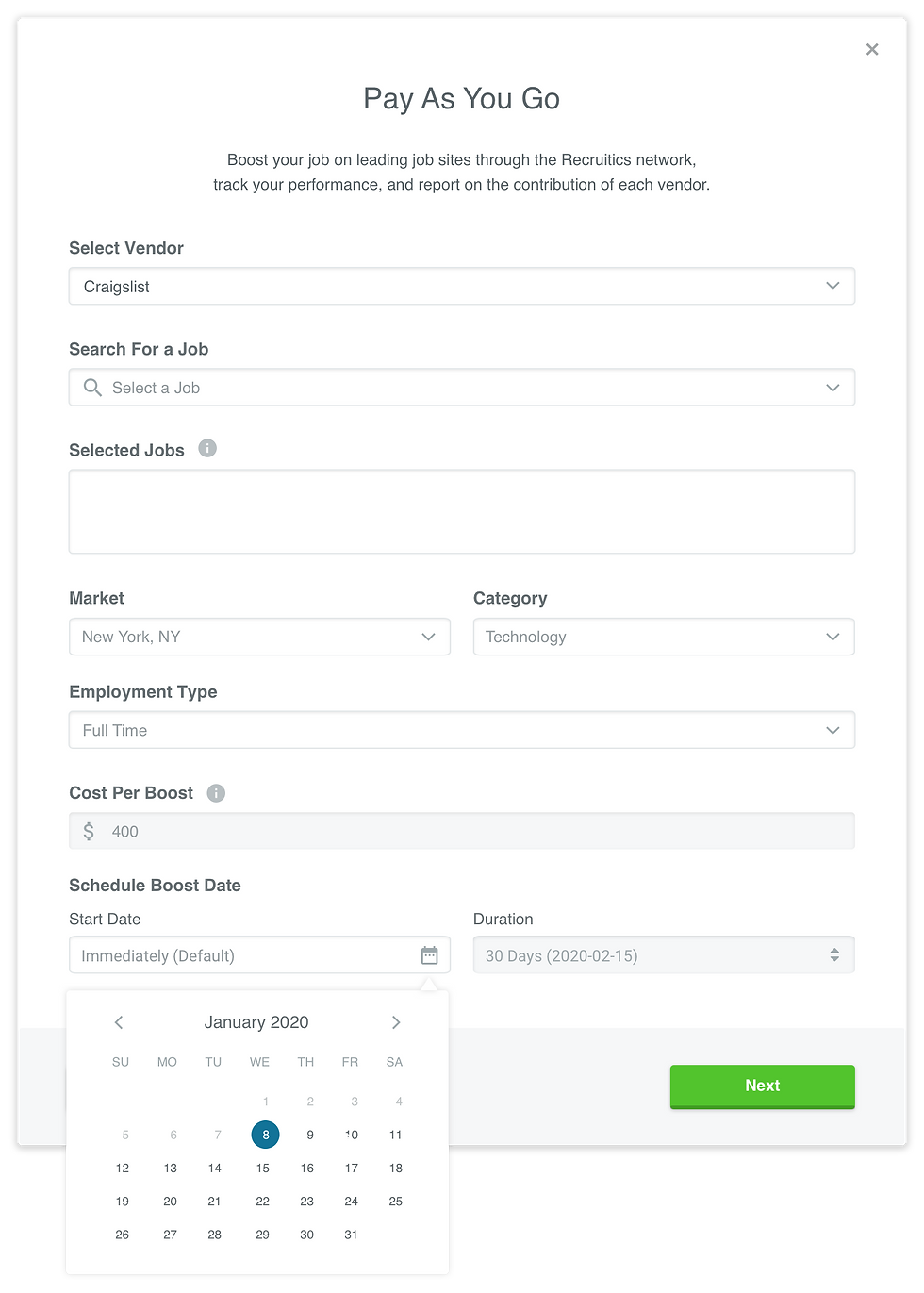
All vendors, excluding Craigslist, require users to select a vendor, enter a job ID, cost per boost, and select the start date and duration of your boost. Craigslist requires this information as well, with the addition of a Market, Employment Type and Category.
02. Edit Job Titles and Descriptions
This feature would prove to be essential as it would allow users to edit poor job titles and descriptions. Often, job titles were long or showed poor practices like using all caps and incorrect grammar. This feature directly improved the performance of the jobs leading to improved cost per clicks and cost per applications by 65%.

CRAIGSLIST
MVP 2 | Enhancing the Functionality
01. Select multiple dates to boost
This feature came in as a direct request from Publisher Operations. One of the things that frustrated them about using Joveo, was not being able to select more than one date at a time to post. This feature would provide value as they could select up to 15 dates for a boost and not have to worry about remembering to post jobs on specific dates.
I had to find a way to now show the user how many days they had selected, as well as providing details on the cost for multiple boosts on multiple dates. I was extremely user focused when designing this as I didn't want to overwhelm the user with lengthy copy and information overload. I had to heavily advocate for the user here as there was feedback coming from my team that we should provide information in several areas of the screen.

In the end, I decided to show the number of boosts with a tooltip that explains that this includes the scheduled boosts. I felt this solution worked well as it went hand in hand with the "Boost Date (6)" area, showing the user all of their dates which represents boosts.
During a feedback session with a user, we were told that it would be helpful to show the 'Cost Per Boost' change as you add dates in the creation modal. (See last prototype). This was valuable feedback and we planned on implementing this in a future release.
02. Creating states for all scenarios
From duplicate job ID’s to missing postal codes, we had to make sure all scenarios were covered in MVP 2 to fully release this feature to the public. Here are some of the few we focused on:
Duplicate Job ID

Users are not able to boost a job that is already active or scheduled. The user would be shown a warning message in addition to a cost summary reflecting the updates. This job would not be included in the boost. There was talk about implementing a flow that would allow the user to manipulate or view the problematic job, in order to make changes and continue with your flow. We decided to keep it simple for this iteration but I think this would have been a valuable addition to the flow.
Job title is too long

Often, a job was sent to the Recruitics feed with titles that exceeded 75 characters. Craigslist does not allow job titles over 75 characters, so the user would be met with a warning message with an option to edit the title. If the job title was not edited, the job would not be boosted.
Missing Postal Code

Craigslist requires a postal code for job posts, so if a job was sent to our feed without one, we would notify the user of this during the flow and automatically assign one to them based on the job market they selected previously. We later introduced the ability to edit the postal code in the flow.
THOUGHTS
Project Summary
Overall, working on this project was extremely rewarding. As soon as we released it, our company immediately saw a drastic amount of savings and new net revenue. The Publisher Operations team was excited and relieved to give Client Strategists more control over Craigslist posts, rather than having to do the work for them. In the end, this release saved everyone time and added value on all ends.
The project was released in April of 2020 which was in the peak of COVID, so while we wanted to follow up with users to see how they were enjoying the new vendor abilities, our time was quite occupied with ad hoc releases to meet immediate business needs.
Ideally, we would have followed up with users a few weeks in for feedback and overall thoughts on the release. Any feedback and areas of opportunity would have become a part of MVP 3.
PROJECT
Scheduled Job Boosts
In an effort to improve the work flow of our Client Strategists, we introduced a new feature that allows them to schedule a job boost. Normally, they have to set reminders to post specific jobs on a certain date. With this feature, they can plan ahead and not have to worry about missing a date or deadline.
GOAL
USERS
User - To be able to schedule job boosts for a time that will result in the best performance for
jobs, i.e. Sunday evenings, even if this time falls outside of working hours.
Recruitics - To improve the performance of job boosts through timing, increasing client
satisfaction and retention.
Client Strategists


SCHEDULED JOB BOOSTS
Scheduling a Job Boost
01. Introducing a "Start Date"
Before we introduced this into the creation modal, users only had the ability to manipulate the boosts duration. Now, they would have the ability to select a “Start Date” if they wanted to schedule a boost. Users could select up to 30 days in the future. Most clients work on a month by month basis with changing campaign and budget goals, so the need for more than 30 days was unnecessary and could potentially create errors in the future.
02. Editing a scheduled job boost
Allowing users to edit a scheduled boost was essential as mistakes can happen and strategy plans can change. It also provides flexibility as Client Strategists are able to make decisions to change the date or duration before a boost goes out.
03. Tabs
Now that there would be two types of boosts, immediate vs. scheduled, it was important that each had their own space. I decided the best place to showcase the two, was on the Job Boost home page. On this page, you can find a table with all sorts of metrics for your boosts, as well as a filter to view active & inactive boosts. Using an existing design pattern found throughout our application, I added a tab component above the table that allows users to select from Boosts and Scheduled Boosts.
PROJECTS
Honorable Mentions
Although the three projects mentioned took up most of my time over the course of 9 months, my team and I worked on many other ad hoc feature releases as well as redesigns. Here are a couple of my favorite projects during my time at Recruitics:
Ability to rearrange Ad Groups
Ad Groups is a functionality in Action that allows users to group jobs that had something in common i.e. the same location or the same campaign. The way Ad Groups are structured on the back end produce a waterfall effect to the jobs. If a user moves an Ad Group on the table, they will instantly see the effect from that Ad Group being moved.
PROBLEM
The only way to re arrange an Ad Group is by using a drag and drop functionality. While it seems convenient, users weren’t able to select an Ad Group and scroll at the same time. Instead, they had to drag the Ad Group to the highest/lowest point of their screen, drop it, scroll, and then repeat the process. This can take hours when you have hundreds of Ad Groups and need to rearrange from spot 80 to 2. Overall, not ideal.
SOLUTION
While different concepts were explored, we always knew we wanted to assign each Ad Group a number. Each number would live in a text field so that the user may enter any number up to the maximum amount of Ad Groups to rearrange with ease.
WHERE IS THIS PROJECT NOW?
Our Client Strategists were heavily involved in feedback sessions as well as sharing of prototypes to test for usability. Not having to drag and drop would save them countless hours, making their workload lighter and efficient. This project was later de prioritized due to ad hoc requests that came in due to COVID. Plans to put it into development was in the works as of July 2020.
Redesigns
Re designs can be a lot of fun, and these were no exception. The only time I’ll really push
for a redesign is if the application is moving in a certain direction and the elements start
to feel outdated or out of touch with the rest of the design system, which was definitely
the case here.
Accelerating hiring success through data + user centered design
Contribution
UX, UI
Timeline
Oct 2019–June 2020
Client
Recruitics
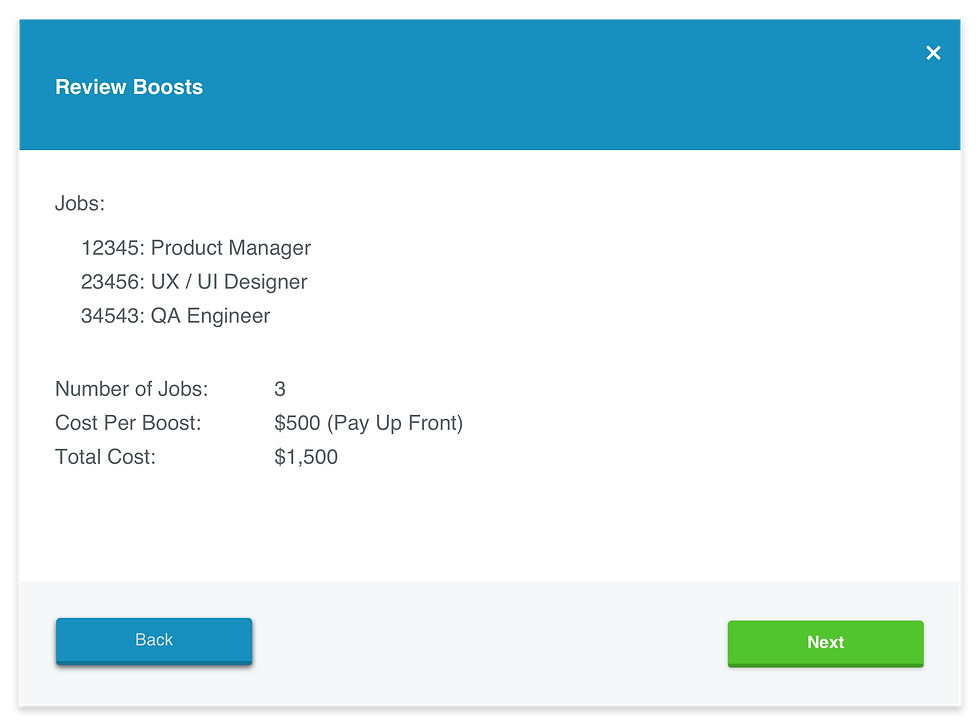
Before - While this design was simple and straightforward, it lacked a good visual structure. In addition, the "Back" button drew too much attention with its blue color.
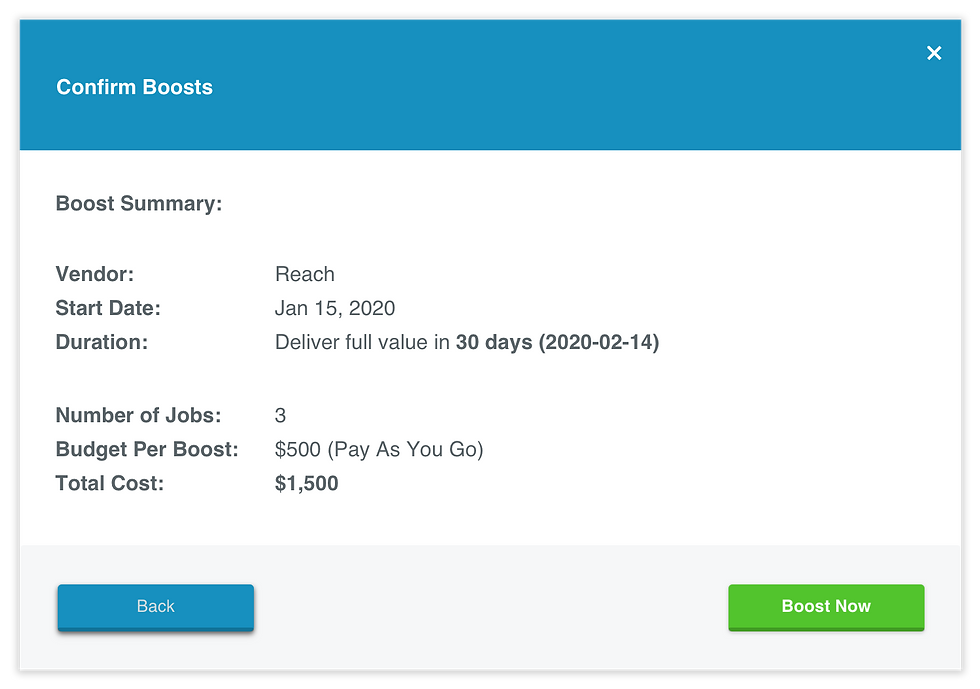
This screen felt very similar to its previous one, making it difficult to differentiate the actions amongst the two.

After - A much cleaner and visually balanced approach. I wanted to highlight the "Total Cost" to make it easier for the user to find, using green to symbolize money. This new design also allowed users to edit Craigslist posts as they go about their flow.

The redesign included giving extra attention to the copy regarding charges. We'd recently released scheduled boosts and the selection of multiple dates which would manipulate the "Total Cost" – it was important to communicate this through language and visual cues.
These screens were re designed in an effort to create a consistent feel with other areas of the application. The entire team was on board as they felt these parts of the flow felt outdated and could use a face lift.
Recruitics was also going through some branding changes at the time, so it felt right to connect with the creative team over in the West Coast to chat about the new direction to make sure it all felt like one consistent brand. In general, they were moving towards a more modern and clean approach, while making our existing brand colors brighter and slightly more intense. Because an application with data as its focus has a different feel than say, a marketing site, I decided to take on some of the modern and clean into some of the modals we were already doing work on. I didn’t want to overwhelm the user with intense bright colors, but I would make use of them in other areas later on.
SUMMARY
My time at Recruitics was a memorable experience. I got to work alongside a passionate team that cared about delivering quality products. The work itself was highly rewarding because I knew it was positively impacting the way my colleagues worked. Working as the only designer brought on challenges, however, it allowed me to grow into my role and left me with a few important takeaways:
Adapting to changing requirements
With changing timelines, team bandwidth and limited resources, learning to not get hung up on a project or requirements can be challenging. I had to adapt to the changes while still delivering quality, usable designs within tight timelines.
Fight the good fight, in the name of UX
It’s not uncommon for product and engineering to have input on what they think is best for a feature or product, especially when working with tight technical constraints. However, if you think a feature is essential to having a good user experience, don’t skimp on it.
Always ask for feedback
Being the only designer doesn’t mean you don’t ask PM’s or Engineers for feedback, quite the opposite, you always should! I was constantly reaching out to my PM and our QA lead on a weekly basis to ensure my designs were in scope and going in the right direction. They’ll even appreciate being part of the design process and get more excited about the product if you end up going with one of their suggestions.